Is Office 2019 Still Supported in 2026? What to Know

Quick Answer
Office 2019 lost support on October 14, 2025 – one year ago. What still works, who it still fits, and when upgrading starts to make sense.
Not for: Microsoft 365 subscribers (still patched, nothing urgent) — and Office 2021 users should read our Office 2021 end-of-support guide instead.
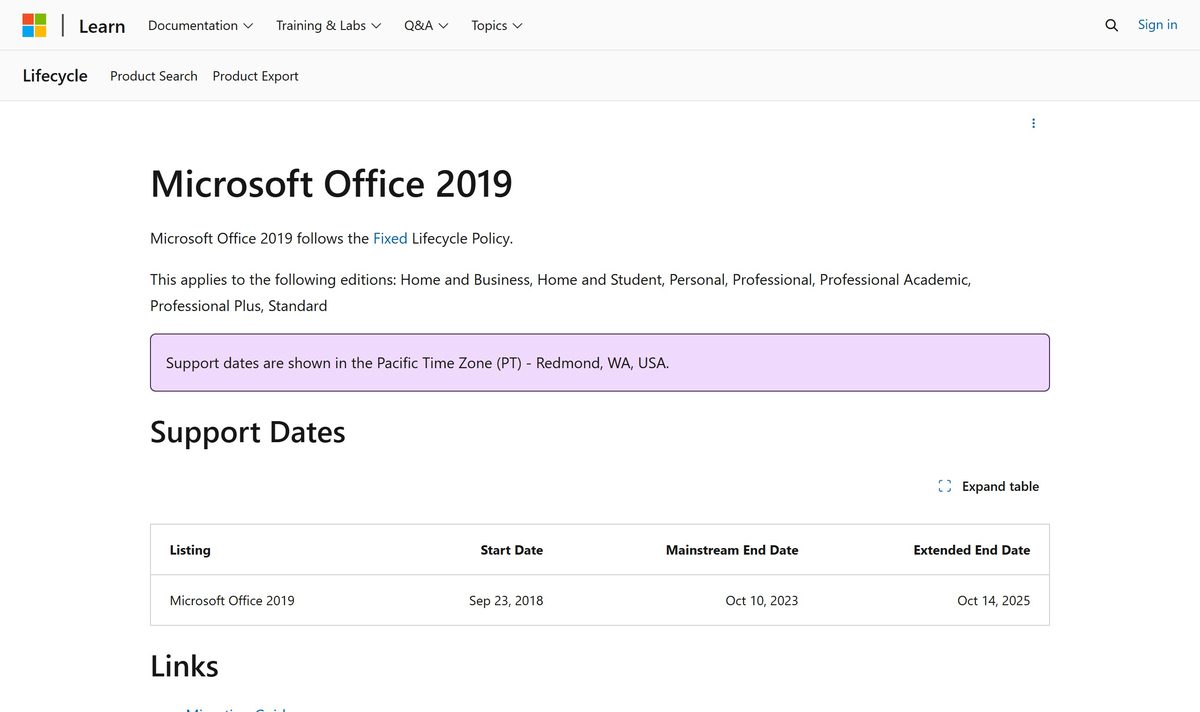
- • Office 2019’s extended support ended on October 14, 2025 — the same day Windows 10 and Office 2016 left support. The whole 2015-2019 desktop generation is now unpatched.
- • The apps keep working and the license is permanent; what ended is the patch stream — and Microsoft 365 cloud connectivity was cut even earlier, in October 2023.
- • Office 2019 still fits offline, single-purpose and legacy-pinned machines; a daily connected PC should move to Microsoft 365 or Office LTSC 2024 (patched to October 9, 2029).
- • File formats have not changed since Office 2007 — docx, xlsx and pptx open identically in newer versions, so moving is a reinstall, not a conversion project.

01Where Office 2019 stands in October 2026
The official numbers are on Microsoft’s lifecycle page: Office 2019 was listed on September 23, 2018, mainstream support ended October 10, 2023, and extended support — the security-patch stream — ended October 14, 2025. There is nothing after that date; no extension, no ESU-style program for perpetual Office, no grace period.
That date was a group exit. Windows 10 and Office 2016 reached end of support the same day — October 14, 2025 — which means the entire 2015-2019 generation of Microsoft desktop software crossed the line together. If you searched this month because a support dialog or an IT notice finally mentioned it, that anniversary is why.
One clarification that saves confusion: support windows for perpetual Office never reopen. Office 2019 will not get a late patch batch the way Windows 10 got its ESU year — the Office side never had that program to begin with. “Still supported” has a short answer: no, since October 2025.
Bottom line: Office 2019 is one year into unpatched status — viable from here on only as a deliberate, contained choice.
02What still works — and what quietly ages
What works, indefinitely: activation (a perpetual license never expires), launching every app, opening and printing every file you already have. There is no kill switch, no watermark, no countdown. A 2019 machine behaves exactly as it did on October 13, 2025.
What quietly ages: every vulnerability discovered in Office components after October 2025 stays unfixed. Microsoft 365 cloud connectivity was cut even earlier — October 2023 — so 2019 apps already run local-only (no Exchange Online, no OneDrive-in-app, no cloud features). Antivirus and browser patches protect the edges, but they cannot patch Word or Excel themselves.
Compatibility aging is slower but real: current Windows versions run Office 2019 without complaint, and Microsoft has announced no cutoff — but “it runs today” is not the same as “it stays tested.” Future Windows updates can surface oddities in untested software, which is one more reason contained machines fare better than daily drivers.
Bottom line: nothing breaks on a schedule — exposure and isolation decide how long 2019 stays sensible.
03Who Office 2019 still fits today
It fits a narrower cast than it did in 2019: an air-gapped or offline home desktop; a single-role box that writes reports or invoices; workshop and lab machines pinned to 2019 because some legacy add-in or export filter only behaves there; and the hand-me-down PC that lives in a kitchen and never opens a browser.
It does not fit the family’s main browsing and email machine, and it does not fit business machines that sit inside a compliance scope — Microsoft’s own lifecycle warnings tie unpatched software to “increased exposure to security risks” and compliance impact. In practice we keep seeing the same split: people who buy Office 2019 keys today almost never ask “is it the newest” — they ask whether a specific old program will run beside it. That is the right question, and it usually means a contained machine, which is exactly where 2019 still makes sense.
Bottom line: Office 2019 fits machines whose job never touches the open internet — everyone else is holding unpatched risk.
04When staying on 2019 stops making sense
The math flips with the machine’s job, not with the calendar. Triggers: the PC starts browsing and handling mail; documents start arriving from outside your circle; a compliance audit enters the picture; a new computer joins the household (license the new one properly instead of copying 2019 forward); or the legacy program that pinned you to 2019 finally ships an update.
When any of those fire, the destinations are the same two Microsoft names: Microsoft 365 Apps (subscription, always current and patched) or Office LTSC 2024 (one-time purchase, fixed features, supported until October 9, 2029). Note the awkward middle child: Office 2021 crossed its own finish line on October 13, 2026 — last week — so between two unpatched perpetual versions, pick by features, not by support (full picture in our Office 2021 end-of-support guide; all options side by side in the Office guides hub). Our Office 2021 migration guide compares all three exits — LTSC 2024, Office 2024 perpetual and Microsoft 365 — side by side.
| Scenario | Stay on 2019? | What to do |
|---|---|---|
| PC never connects to the internet | Yes, fine | Nothing urgent; review once a year |
| Daily mail and web browsing | No | Move to Microsoft 365 or Office LTSC 2024 |
| Business PC, compliance in scope | No | Upgrade before the next audit cycle |
| Legacy app only works with 2019 | Yes, contained | Keep the machine isolated; plan an exit date |
Bottom line: the moment a 2019 machine meets the open internet or an auditor, staying stops being free.

05Moving off 2019 without breaking your files
The files are the easy part. Word, Excel and PowerPoint formats have not changed since Office 2007 — docx, xlsx and pptx open identically in Office 2021, LTSC 2024 and Microsoft 365. Moving off 2019 is a reinstall, not a conversion project; nothing needs exporting or “upgrading.”
What does not carry over automatically lives outside the documents: autocomplete lists, custom dictionaries and templates stored in the old user profile, and any COM add-ins built for 2019. Export templates explicitly, and expect one re-enable round for add-ins. Macros in workbooks (VBA) keep working unchanged — the macro language has not moved.
If the decision is to stay on 2019 and set the machine up fresh instead, the full walkthrough lives in our Office 2019 Pro Plus install and activation guide — same steps apply whether the key is brand new or years old.
Bottom line: budget an hour for settings and add-ins, not a weekend — the documents themselves just open.

06Straight answers on Office 2019 in 2026
Can I still buy Office 2019? Yes — keys activate and the license is permanent, and retail channels (including our Office 2019 Pro Plus listing) keep serving offline and fixed-role machines. Will it stop working? No — nothing about activation is time-limited. 2019 or 2021 today? Both are unpatched now (2021 ended October 13, 2026), so between them choose by features — for patches, the only current answers are Microsoft 365 and Office LTSC 2024.
Bottom line: buying 2019 in 2026 is a tooling decision for contained machines — not a bargain for a daily PC.
FAQ
Is Office 2019 still supported in 2026?
No. Extended support ended on October 14, 2025, which made Office 2019 unpatched for over a year now. The apps run and licenses stay valid; only the security-update stream is gone.
Can I still buy an Office 2019 license?
Yes. Perpetual keys still activate and remain valid indefinitely, which is why our Office 2019 Pro Plus listing continues to serve offline, workshop and fixed-role machines. For a daily internet-connected PC, plan a move to Microsoft 365 or Office LTSC 2024 instead.
Will my Office 2019 files open in newer versions?
Yes. The .docx, .xlsx and .pptx formats have not changed since Office 2007, so documents open identically in Office 2021, LTSC 2024 and Microsoft 365. Settings and add-ins – not files – are the only things that need attention when moving.
Should I buy Office 2019 or Office 2021 today?
Neither receives patches anymore – Office 2021’s support ended on October 13, 2026. For an offline single-purpose machine either perpetual version works; choose by the features you need. For anything that touches the open internet, Microsoft 365 or Office LTSC 2024 (patched to October 9, 2029) are the supported answers.
External References
- • Microsoft Learn — lifecycle: Microsoft Office 2019 (ended Oct 14, 2025)
- • Microsoft Learn — end of support resources for Office (M365 services connectivity)
- • Microsoft Learn — plan an upgrade from older versions of Office
- • Microsoft Learn — lifecycle: Office LTSC 2024 (to Oct 9, 2029)
- • Microsoft Learn — ending support in 2025 (Windows 10, Office 2016/2019)
- • Microsoft Support — Office 2024 and Office LTSC 2024 FAQ
KeyStarter is a Microsoft legitimate reseller/Distributor. This article was compiled with AI assistance for research and drafting and has been editorially reviewed. Prices shown at checkout reflect dealer quotes, not Microsoft official pricing.