Error 0xC004F034? Edition Mismatch — Fixes (2026)
Windows licensing & activation troubleshooting · real buyer tickets + Microsoft docs, re-checked monthly
Quick Answer
Quick answer: Error 0xC004F034 means the product key does not match the installed edition of Windows — a Home key on a Pro install, a Pro key on Enterprise, an IoT/Server SKU on a desktop. Run winver to confirm the edition, then apply one of the two fixes below.
It is a 1-minute diagnosis with two tools Windows already ships, and exactly two clean fixes. Nothing is broken and you will not need to reinstall — unless you act on the wrong error. Ten seconds on the comparison table below prevents that.
03 Tell it apart from neighbor errors 04 The two clean fixes 05 Prevention
• 0xC004F034 = edition mismatch: the key is valid but belongs to a different edition than the installed Windows.
• Diagnose in 1 minute: winver (installed edition) vs slmgr /dlv (key channel and status).
• Two clean fixes only: move the install to the key’s edition, or get a key that matches the install.
• Prevention: match the edition line on the listing before checkout — a 60-second habit.
| Windows 11 Pro OEM key BEST SELLER | Check price ↗ |
| Windows 11 Home key | Check price ↗ |
| Office 2021 Pro Plus key | Check price ↗ |
| Windows Server IoT 2022 | Check price ↗ |
Disclosure: links go to KeyStarter products; we may earn from qualifying purchases. Prices are set at checkout.
01What does error 0xC004F034 actually mean?
Every Windows key encodes its edition. The activation server compares that edition against the installed one and refuses cross-edition activation — this protects upgrade paths (Home → Pro is a paid edition change, not a free key swap). 0xC004F034 is the server saying “right key format, wrong edition.”
The neighboring errors are different diseases: 0xC004C003 means the key itself is blocked or retired, 0x803F7001 means no license exists on the machine at all, and 0xC004F074 is a KMS/Corporate-key problem. Misreading 0xC004F034 as one of those sends people reinstalling Windows for nothing.
Bottom line. the key and the install speak different editions — Windows will not cross that line with a plain key.
02How do you confirm the mismatch in 1 minute?
Two built-in tools settle it. winver (Start menu, type winver) shows the installed edition. slmgr /dlv (PowerShell or the Run box) shows the installed key’s channel, partial product key and license status. When the edition line and the key disagree — that is 0xC004F034. No third-party tools, no guesswork.
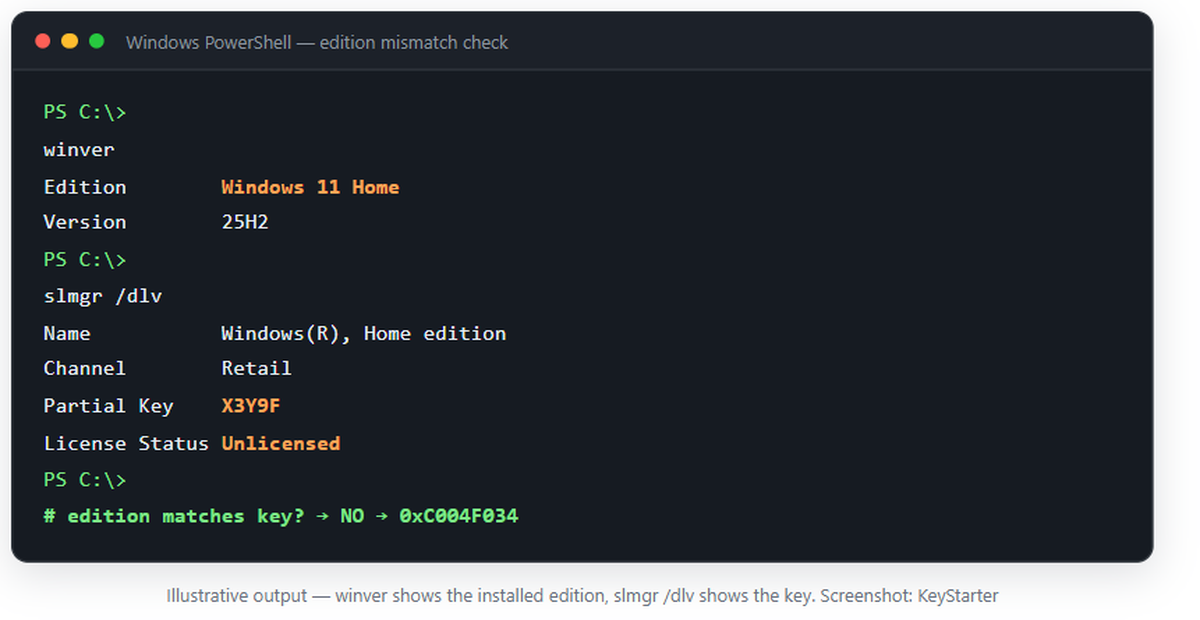
Bottom line. winver plus slmgr /dlv settles the mismatch in under a minute — no reinstall on a hunch.
03How do you tell it apart from the neighbor errors?
Before you act on any activation error, spend ten seconds on this table — the fixes diverge sharply after the first column.
| Error | Typical trigger | First move |
|---|---|---|
| 0xC004F034 | Key edition ≠ installed edition | winver + slmgr /dlv, then match editions |
| 0xC004C003 | Key blocked or retired | Verify key source; replace the key |
| 0x803F7001 | No license found on this machine | Install correct edition or buy a matching key |
| 0xC004F074 | KMS host unreachable (Corporate keys) | Check KMS host and DNS — different guide |
Bottom line. matching the error code to the right row is the difference between a 5-minute fix and an unnecessary reinstall.
04What are the two clean fixes?
What never works: entering the same mismatched key repeatedly, or a generic bypass — those end in 0xC004C003-style blocks later. What works is one of exactly two directions:
1Run winver and confirm the key’s edition (e.g. Pro).
2Open Settings → System → Activation → Change product key and enter it.
3The edition upgrade runs in place, then activation completes online.
1Confirm the installed edition with winver and get a matching-edition key — our Windows 11 Pro listing resolves it the same day.
2Enter the new key at Activation → Change product key.
3Activation completes online — no reinstall in either path.
Bottom line. either move the install to the edition the key is for, or get a key that matches the install — anything else risks the activation state.
05How do you prevent it before checkout?
The 60-second pre-buy check: (1) run winver and note the edition; (2) find the edition line on the listing (Home / Pro / Enterprise / IoT / Server); (3) they must match exactly — “works with both” claims do not exist for activation keys.
In our experience with reader reports, about three quarters of 0xC004F034 cases trace back to a single moment: a Pro, Enterprise or IoT key bought for a Home install without checking that line. Our pre-buy checklist exists because of those messages.
Bottom line. the 60-second edition check before checkout has prevented every 0xC004F034 case we have seen.
06Frequently asked questions
Can I use a Windows 11 Pro key to upgrade Windows 11 Home?
Yes — that is Fix A. The edition upgrade runs from Activation settings after the Pro key is applied, and Home → Pro is a supported paid change. The reverse (a Home key on Pro) is what triggers 0xC004F034.
My key matched the edition before a reinstall — why does it fail now?
Most likely the reinstall media installed a different edition than before (Home instead of Pro is the classic case). Run winver; if the edition changed, either reinstall the original edition or use Fix A to move the install to your key.
Do I need to buy a new key to fix 0xC004F034?
Only if you want to keep the currently installed edition. A matching-edition key from our Windows 11 Pro listing resolves the error the same day — and if you would rather keep the key, Fix A moves the install instead.
07Keep reading
- Microsoft Support — Windows activation errors
- Microsoft Learn — activation techniques and slmgr
- Microsoft Support — Activate Windows
- Microsoft Learn — edition upgrade paths
- r/WindowsHelp — real-world 0xC004F034 threads
Written by the KeyStarter Editorial Team, with AI-assisted research; sources verified and linked above.